Advanced Power BI Masterclass Training in Singapore
Ready to push Power BI well beyond the basics? This Advanced Power BI course in Singapore is built for analysts who already create reports and want to master the techniques that separate good dashboards from great ones — advanced DAX, time intelligence, performance tuning, row-level security, and AI-driven visuals.
Over two intensive, hands-on days you will deepen your data modelling, write sophisticated calculations, optimise sluggish reports, and build polished, secure dashboards that management can rely on. The course is led by Vinai Prakash, who brings decades of data-analysis and business-intelligence experience.
What You Will Learn
- Write advanced DAX measures for richer, more flexible analysis.
- Apply advanced Power Query techniques to shape and combine complex data.
- Implement row-level security to control who sees what.
- Optimise data models to keep them small, fast, and reliable.
- Import custom visuals and create Python or R visualizations.
- Use KPI cards, gauges, AI visuals, Quick Measures, and advanced time-intelligence comparisons.
Who Should Attend
- Business analysts and data professionals with a working knowledge of Power BI.
- Report builders who want stronger visualization and analysis skills.
- Anyone ready to take Power BI from intermediate to advanced level.
Prerequisites
- Basic Power BI knowledge, including importing data and writing simple DAX measures.
- Familiarity with building basic reports and dashboards in Power BI.
Course Outline
Data Modelling & Cleansing
- Get data from files, folders, relational and NoSQL databases, online services, and Azure Analysis Services.
- Choose storage modes and resolve import, data-type, and data-quality errors.
- Shape and simplify data, combine tables, profile data, and edit M code in the Advanced Editor.
Advanced DAX Measures
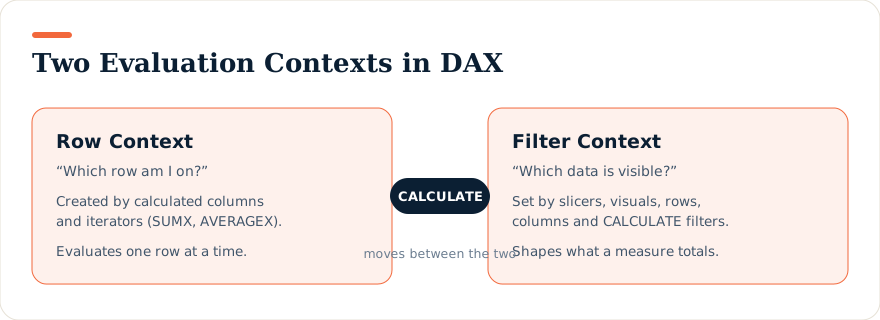
- CALCULATE and filter context, IF / SWITCH / FIND, and VALUES, HASONEVALUE, SELECTEDVALUE, CONCATENATEX.
- ALL, ALLEXCEPT, ALLSELECTED, KEEPFILTERS, and virtual tables.
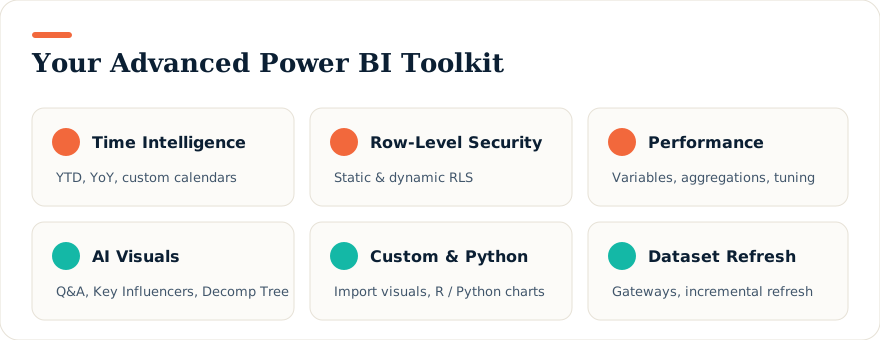
- Semi-additive measures, advanced date comparisons (same period last year, YTD, MTD), and custom time-intelligence functions.
Performance Optimization
- Review the performance of measures, relationships, and visuals.
- Use variables, reduce cardinality, optimise DirectQuery, and manage aggregations.
Visuals, Reports & Dashboards
- Choose, format, and configure effective visuals; import custom visuals; add R or Python visuals.
- Build data-driven reports with bookmarks, drill-through, conditional formatting, and mobile layouts.
- Create dashboards with data alerts, themes, real-time tiles, and Q&A.
Analytics, AI, Security & Datasets
- Statistical summaries, outliers, clustering, time-series analysis, and AI Insights.
- AI visuals — Q&A, Key Influencers, and the Decomposition Tree.
- Workspaces and lifecycle management, static and dynamic row-level security.
- Parameters and what-if analysis, gateways, scheduled and incremental refresh, and dataset management.
Funding & Certification
This advanced programme is WSQ-funded and SkillsFuture-eligible for those who qualify, with UTAP available to NTUC members. Corporate sessions for teams can be tailored on request.
Upcoming Course Dates
Loading upcoming dates…