Power BI Data Analytics & Visualization Training in Singapore
This hands-on Power BI course in Singapore takes you from raw, messy data to polished, interactive dashboards in just two days. You will learn to connect and reshape data with Power Query, model it correctly, write DAX measures that surface real business insight, and publish live reports that refresh automatically in the cloud.
The class begins with the Excel data-analysis foundations that matter, then moves into the Power BI toolset — Power Query, the data model, and DAX — all inside Power BI Desktop. By the end you will be comfortable building dashboards that turn day-to-day data into decisions.
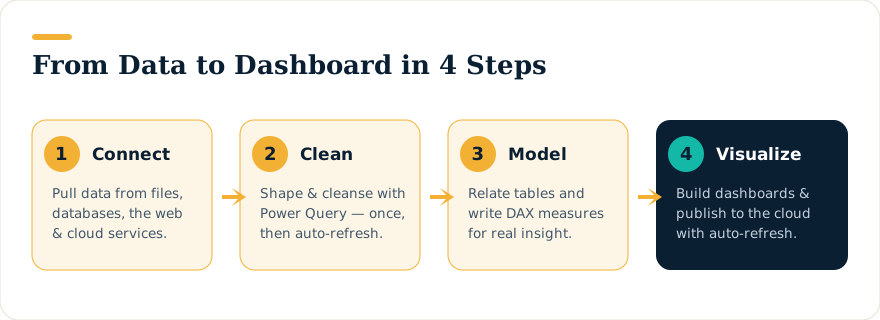
What You Will Learn
- Import data from many sources and clean it automatically with Power Query.
- Build a sound data model by relating multiple tables — and retire the VLOOKUP habit.
- Write DAX measures, from basic aggregations to
CALCULATE(), time intelligence, and running totals. - Design clear, interactive visualizations and dashboards.
- Publish to the Power BI Service, share securely, and schedule automatic refresh.
![Anatomy of a DAX measure: Revenue YTD = CALCULATE( SUM(Sales[Amount]), DATESYTD(Calendar[Date]) ), with each part labelled.](https://dataanalyticscourses.sg/wp-content/themes/dataanalyticscourses-theme/assets/img/info-power-bi-dax.svg)
Who Should Attend
This course suits anyone who works with data and wants to analyse and present it faster:
- Regular Excel users responsible for reporting and analysis.
- Finance, accounting, and banking professionals handling large datasets.
- Data analysts building performance and trend analysis for decision-makers.
- Business users tracking marketing, sales, and operational metrics.
- BI and database professionals expanding into self-service analytics.
Complete beginners are welcome — the course is taught from the ground up.
Prerequisites
- Comfortable using Excel day to day and writing simple formulas (SUM, IF, nested IF).
- Some exposure to PivotTables or lookup functions such as SUMIF or VLOOKUP is helpful but not essential.
- Anyone with a database, BI, or programming background is well prepared, even with limited Excel experience.
Power BI Desktop is free to download from Microsoft, and a fully configured laptop can be provided for use during the class.
Course Outline
Day 1 — Foundations
- Introduction to Power BI — when and why to use it, and a tour of the environment.
- Loading & cleaning data — data-loading methods in Power Query, trade-offs, best practices, and building a multi-table model.
- Formulas and DAX — reference syntax, measures vs. calculated columns, COUNTROWS and DISTINCTCOUNT, aggregator and iterator functions.
- Working with multiple tables — relationships, data vs. lookup tables, and troubleshooting model problems.
- DAX measures that matter — CALCULATE, ALL and percentage-of-total, time intelligence, and year-to-date running totals.
- What-if analysis using disconnected tables and slicers.
Day 2 — Advanced Analysis & Publishing
- More DAX — the Vertipaq engine, FILTER, and custom calendars.
- DAX patterns for common real-world problems and custom time intelligence.
- Power Query deep dive — built-in transformations and an introduction to the M language.
- Performance — keeping files small and calculations fast, sharing, and refresh options.
- Advanced visualizations and how Power BI thinking differs from Excel.
- Publishing to the Power BI Service — sharing, Q&A, mobile apps, and dashboards.
Funding & Certification
This is a WSQ-funded, SkillsFuture-eligible programme for those who qualify, and NTUC members may use UTAP to offset part of the remaining fee. Training is led by Intellisoft’s founder and Master Trainer, Vinai Prakash. Corporate runs for teams of 15 or more can be arranged at your premises or ours.
Upcoming Course Dates
Loading upcoming dates…